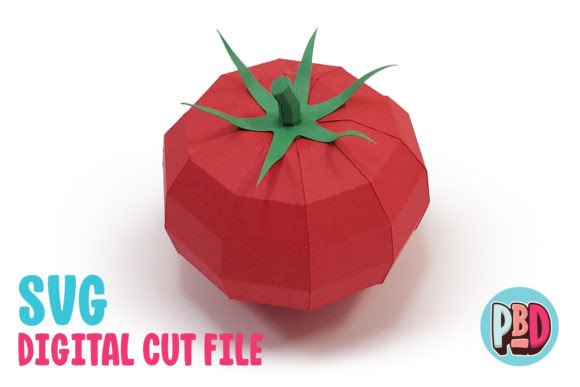
Tomato 3D Papercraft: A Creative Addition to Your Fall Decor
If you're looking for a unique and engaging way to add a touch of autumn to your home or event, the Tomato 3D Papercraft is an excellent choice. This design brings a vibrant, lifelike tomato to life using paper, making it a perfect fit for fall decor, harvest parties, or any seasonal celebration. With its simple yet striking appearance, this papercraft project offers both aesthetic appeal and a fun creative challenge.
Understanding the Tomato 3D Papercraft
The Tomato 3D Papercraft is a downloadable design that includes SVG and DXF cut files along with detailed PDF instructions. It's designed to be constructed using medium cardstock, which provides the right balance of durability and ease of handling. The finished piece measures 4 inches in width, 4 inches in depth, and 3.5 inches in height—making it a manageable size for display on tables, shelves, or as part of a larger arrangement.
This papercraft is ideal for individuals who enjoy hands-on projects and want to create something visually appealing without needing advanced crafting skills. Whether you're a beginner looking to try your hand at 3D paper art or a seasoned crafter seeking a new project, the Tomato 3D Papercraft offers a rewarding experience.
Common Mistakes and Misunderstandings
While the Tomato 3D Papercraft is straightforward, there are several common mistakes that can affect the final outcome. One of the most frequent issues is not properly preparing the materials before starting. For instance, failing to check the recommended cardstock weight can lead to a weak structure that collapses during assembly. Always refer to the instructions to ensure you're using the correct type of paper.
Another mistake involves the use of cutting software. The SVG files are compatible with Silhouette Designer Edition and Cricut Design Space, but they may not work with other platforms. If you're using a different software, you might encounter issues with file compatibility or quality. Similarly, the DXF files are intended for Silhouette Basic Edition, and users often overlook the need to adjust preferences in Silhouette Studio. Failing to set the DXF preferences to “Centered” instead of “As-is” can result in misaligned pieces that are difficult to assemble.
How These Mistakes Affect Results
Incorrect material choices can lead to a less durable or less visually appealing finished product. If the cardstock is too thin, the tomato may sag or lose its shape. On the other hand, if it's too thick, it may be challenging to fold and glue properly. Both scenarios can detract from the overall quality of the project.
Software-related issues can also cause frustration. If the files don't load correctly, you may end up with incomplete or incorrectly sized pieces, which can make the assembly process more time-consuming and error-prone. Additionally, using the wrong file format can result in poor cut quality, leading to jagged edges or misaligned parts.
Practical Advice to Avoid Common Pitfalls
To ensure a smooth experience, start by reviewing the full material list provided in the instructions. This will help you gather all the necessary supplies before beginning. If you're unsure about the type of cardstock to use, consider purchasing a small sample pack to test different weights and textures.
When working with digital files, take the time to familiarize yourself with the software you'll be using. For example, if you're using Silhouette Studio, make sure to adjust the DXF preferences as instructed. This simple step can save you time and prevent unnecessary complications during the cutting process.
It's also a good idea to test the files on a small scale before committing to the full project. Print out a few pieces and see how they fit together. This can help you identify any potential issues early on and make adjustments as needed.
What to Check Before Starting
Before diving into the project, double-check that you have all the required tools and materials. This includes scissors, a ruler, glue, and a cutting mat if you're using a die-cutting machine. Having everything ready will help you stay focused and avoid interruptions during the assembly process.
Additionally, make sure your computer and software are up to date. Outdated programs can sometimes cause compatibility issues with the files, leading to errors or incomplete downloads. If you're experiencing trouble with the files, try downloading them again or reaching out to the seller for support.
Enhancing Your Experience with Tomato 3D Papercraft
Once you've completed the Tomato 3D Papercraft, consider how you can incorporate it into your space or events. It makes a great centerpiece for a fall table setting or a decorative element for a harvest-themed party. You can also personalize it by adding details like stickers, paint, or markers to give it a unique touch.
For those interested in selling or sharing their creations, the Tomato 3D Papercraft offers a versatile base that can be customized for different occasions. Whether you're creating a batch for a craft fair or giving it as a gift, the possibilities are endless.